Page 1 of 1
Gallery If InZaNe101
Posted: Sat Feb 21, 2009 11:59 -0700
by Inzane101
<a href="
http://s33.photobucket.com/albums/d72/i ... 1002-1.jpg" target="_blank"><img src="
http://i33.photobucket.com/albums/d72/i ... 1002-1.jpg" border="0" alt="Photobucket"></a>
<a href="
http://s33.photobucket.com/albums/d72/i ... G_1004.jpg" target="_blank"><img src="
http://i33.photobucket.com/albums/d72/i ... G_1004.jpg" border="0" alt="Albedo VOL1"></a>
<a href="
http://s33.photobucket.com/albums/d72/i ... G_1012.jpg" target="_blank"><img src="
http://i33.photobucket.com/albums/d72/i ... G_1012.jpg" border="0" alt="Albedo NR0 VOL0"></a>
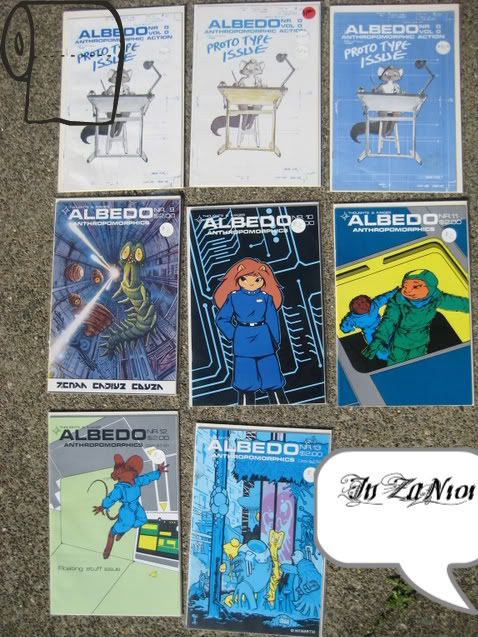
I found this in a comic collection of over 10,000 I have 2 others there all different versions of Vol 0 NR 0 I will post pictures shortly. Also I am going to Comic Conn I live right near SF. sounds fun.
Posted: Sat Feb 21, 2009 13:48 -0700
by Mayhem
You left HTML off in your post there mate

Posted: Sat Feb 21, 2009 19:52 -0700
by Inzane101
...
Posted: Sat Feb 21, 2009 20:08 -0700
by Inzane101
What do you mean I am a noob When It comes to posting and sending it with the HTML How do I do that???
<a href="
http://s33.photobucket.com/albums/d72/i ... 1010-1.jpg" target="_blank"><img src="
http://i33.photobucket.com/albums/d72/i ... 1010-1.jpg" border="0" alt="Photobucket"></a>
Posted: Sat Feb 21, 2009 22:48 -0700
by Mayhem
Having done some quick experimenting it appears despite what the tickboxes may say, HTML is off for the entire forum and can't be re-enabled. You'll have to use the IMG or URL tags instead.
Picture 1
Picture 2
Picture 3
Picture 4
Posted: Sun Feb 22, 2009 0:45 -0700
by Steve Hubbell
Mayhem, The images Inzane101 posted are showing up fine for me. Any chance you have your personal settings for html turned off?
Posted: Sun Feb 22, 2009 0:49 -0700
by Inzane101
Doh know!!!
Posted: Sun Feb 22, 2009 0:54 -0700
by Steve Hubbell
click on the little X button on the upper right side of the message, just past where it says edit and quote...
If it isn't there, let me know and I can delete it for you.
Prototype Albedo #0
Posted: Sun Feb 22, 2009 8:26 -0700
by go
Dear Readers,
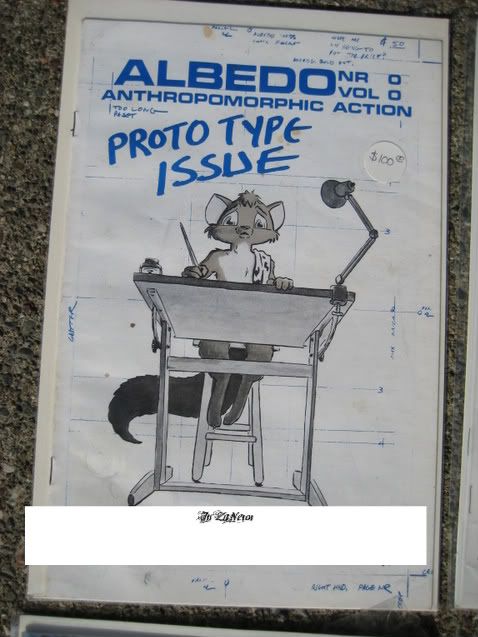
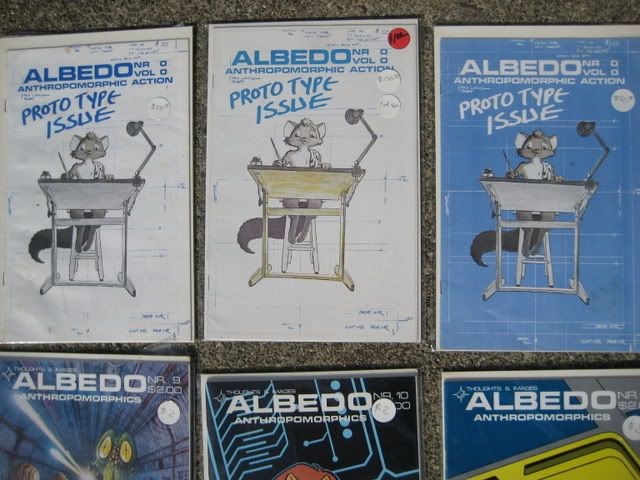
The white cover Prototype Albedo #0 (no red price tag) is a very rare first printing approximately 450 copies..
There is only one more rare and it looks like the white cover but the table has a yellow color in it (no red price tag) , approximately 50 copies .
"There were problems with registration on the color printer." Steven A. Gallacci.
Both are called first printings but the yellow table version was printed first.
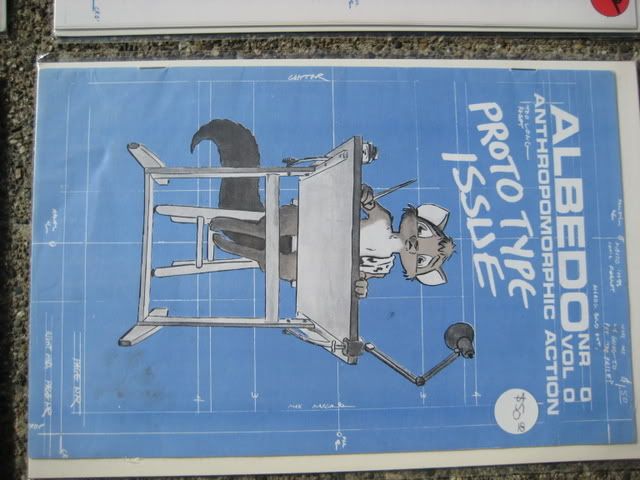
The blue cover is also called a first printing.
"The cover was designed to be blue, but the printer misread the instructions. So, when the rest of the batch was run up, the cover was redone."
The second and third printings have a blue cover with the price removed.
The white cover with red price tag is a fourth printing. The references here are from the inside cover page of a fourth printing.
The person pricing the third printing made a mistake thinking it was the rare first printing with a yellow table.
Congratulations on your Albedo treasures.
Best wishes to all!
go
ps. Please let me know if you find Prototype Albedo #0 with a yellow table........
pps Your images appear just fine on my mac using Firefox browser.
Posted: Sun Feb 22, 2009 10:44 -0700
by Mayhem
Steve Hubbell wrote:Mayhem, The images Inzane101 posted are showing up fine for me. Any chance you have your personal settings for html turned off?
Nope, I've got HTML turned on. The images showed up fine in the preview pane but not in the final post. Very strange...
Posted: Sun Feb 22, 2009 12:58 -0700
by Stan Sakai
Thanks for posting the pictures, Mayhem. When I tried linking to the sites, it told me I had to log in with a password.